
In today’s technology-driven world, Arduino has become one of the most popular platforms for learning electronics, programming, robotics, and IoT (Internet of Things). Whether you are a school student, engineering graduate, hobbyist, or someone looking to start a career in embedded systems, learning Arduino is one of the best ways to build practical technical skills.
This guide explains what Arduino is, why it is important, what you can build with it, and how beginners can start learning Arduino from scratch.
What Is Arduino?
Table of Contents
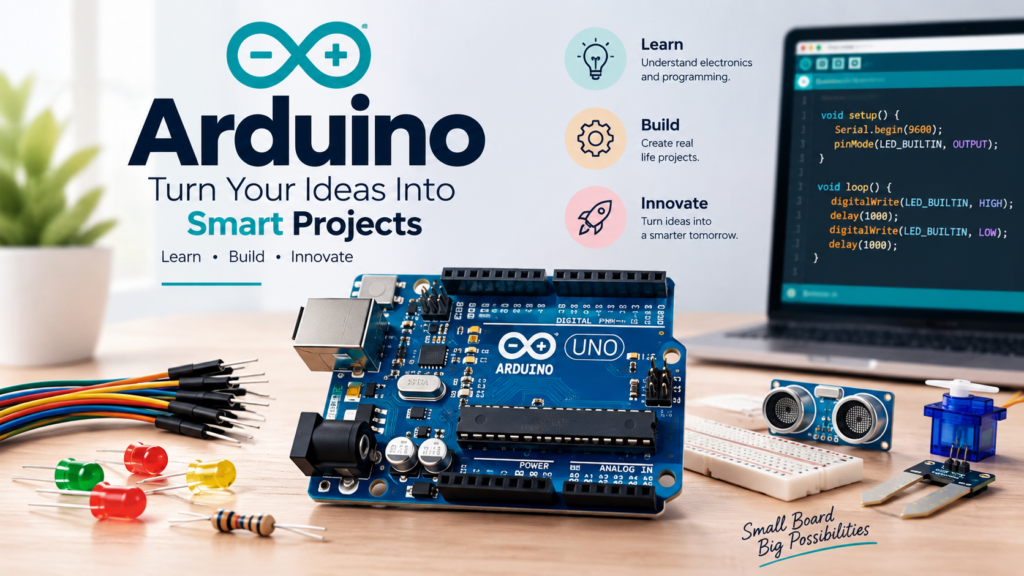
ToggleArduino is an open-source electronics platform based on easy-to-use hardware and software. It consists of a programmable microcontroller board and the Arduino IDE (Integrated Development Environment), where you write and upload code to the board.
Arduino is designed to make electronics and programming accessible for everyone, even if you have no prior experience in coding or circuit design.
Some popular Arduino boards include:
- Arduino Uno
- Arduino Nano
- Arduino Mega
- Arduino Leonardo
- Arduino ESP32-compatible boards (for IoT projects)
Why Learn Arduino?
Arduino is widely used in education, research, product development, and DIY electronics projects. It is considered one of the easiest ways to enter the world of embedded systems and automation.
Benefits of Learning Arduino
- Beginner-friendly programming
- Easy circuit building
- Large global community
- Thousands of free tutorials and libraries
- Affordable hardware
- Useful for robotics and IoT
- Great for engineering projects
- Helps develop problem-solving skills
Learning Arduino gives hands-on experience that traditional programming courses often lack.
How Arduino Works
An Arduino board contains a microcontroller that reads inputs and controls outputs.
Inputs
- Push buttons
- Temperature sensors
- Motion sensors
- Light sensors
- Ultrasonic sensors
- Gas sensors
- Bluetooth and Wi-Fi modules
Outputs
- LEDs
- Buzzers
- DC motors
- Servo motors
- Relays
- LCD displays
- OLED screens
For example, an Arduino can read a temperature sensor and automatically turn on a fan when the temperature becomes high.
Arduino Programming Basics
Arduino programming is b
ased on C/C++, but it is simplified for beginners.
Every Arduino program contains two main functions:
void setup() {
    // runs once
}

void loop() {
    // runs repeatedly
}
Example: Blinking an LED
void setup() {
    pinMode(13, OUTPUT);
}

void loop() {
    digitalWrite(13, HIGH);
    delay(1000);
    digitalWrite(13, LOW);
    delay(1000);
}
This simple program turns the LED on and off every second.
Arduino IDE
The Arduino IDE is free software used to write, compile, and upload programs to Arduino boards.
Main Features
- Code editor
- Compiler
- Serial monitor
- Library manager
- Board manager
- One-click upload
The IDE supports Windows, macOS, and Linux.
Essential Components for Beginners
To start practicing Arduino, you usually need:
- Arduino Uno board
- USB cable
- Breadboard
- Jumper wires
- LEDs
- Resistors
- Push buttons
- Servo motor
- Ultrasonic sensor
- Temperature sensor
- Buzzer
Most beginner Arduino kits include all these components.
Popular Arduino Projects
LED Blinking System
The first project for almost every Arduino learner.
Traffic Light Controller
Uses multiple LEDs to simulate a real traffic signal.
Automatic Street Light
Turns lights on when it becomes dark using an LDR sensor.
Ultrasonic Distance Meter
Measures distance using an ultrasonic sensor.
Temperature Monitoring System
Displays temperature readings on an LCD screen.
Smart Home Automation
Controls lights and appliances using Bluetooth or Wi-Fi.
Obstacle Avoiding Robot
A robot that detects obstacles and changes direction automatically.
RFID Door Lock
Creates a secure access control system using RFID cards.
Arduino and IoT
Arduino can be connected to the internet using Wi-Fi or Ethernet modules, allowing it to become part of the Internet of Things (IoT).
Examples include:
- Smart home devices
- Weather stations
- Plant monitoring systems
- Water level monitoring
- Energy management systems
- Industrial automation
IoT projects are increasingly valuable in industries such as agriculture, healthcare, manufacturing, and smart cities.
Arduino vs Raspberry Pi
Many beginners confuse Arduino with Raspberry Pi.
| Arduino | Raspberry Pi |
|---|---|
| Microcontroller | Single-board computer |
| Runs one program | Runs a full operating system |
| Ideal for sensors and hardware control | Ideal for computing and networking |
| Low power consumption | Higher power consumption |
| Real-time control | Better for advanced software projects |
Arduino is usually the better choice for beginners interested in electronics and embedded systems.
Career Opportunities After Learning Arduino
Arduino skills can help you move into several technical fields.
Possible Career Paths
- Embedded Systems Developer
- IoT Developer
- Robotics Engineer
- Automation Engineer
- Electronics Technician
- Mechatronics Engineer
- Hardware Prototyping Engineer
- Research and Development Engineer
Many startups and engineering companies use Arduino for rapid prototyping and product development.
How to Start Learning Arduino
Step 1: Learn Basic Electronics
Understand voltage, current, resistance, LEDs, and simple circuits.
Step 2: Install Arduino IDE
Download and install the official Arduino IDE.
Step 3: Practice Basic Programs
- Blink LED
- Read button input
- Control buzzer
- Read sensor values
Step 4: Build Small Projects
Start with simple automation and display projects.
Step 5: Learn Advanced Topics
- PWM
- Interrupts
- Serial communication
- I2C
- SPI
- Wi-Fi and Bluetooth modules
- IoT integration
Consistency is more important than speed. Building one project every week is an excellent learning strategy.
Common Mistakes Beginners Make
- Incorrect wiring
- Forgetting to select the correct board
- Wrong COM port selection
- Missing libraries
- Power supply issues
- Not checking serial monitor output
Learning to troubleshoot these problems is part of becoming a skilled Arduino developer.
Final Thoughts
Arduino is one of the easiest and most powerful platforms for learning electronics, programming, robotics, and IoT. It allows beginners to create real working devices with minimal cost and complexity. From blinking an LED to building smart home automation systems and robotic projects, Arduino provides a practical path into the world of embedded technology.
If you want to develop hands-on technical skills, create innovative projects, or start a career in electronics and automation, learning Arduino is an excellent first step. With regular practice and project-based learning, you can quickly progress from a complete beginner to building impressive smart systems and IoT applications.